1.
OVERVIEW
How I redesigned the way an enterprise identity platform onboards unknown users — turning a copy-paste credential ritual into a single shareable link, validated with 28 stakeholders across four business segments.
Sole Designer
End-to-end Design
Full-time
Phoenix
Customer Admin management
ROLE
Product Designer
(Internal Admin tool)
TEAM
2 PMs
1 Researcher
1 Designer
TIMELINE
Q4 2025 - Q1 2026
SCOPE
Internal Admin tool(owned)
External admin dashboard(Contributed
UMUX-Lite Score improvement
Time on task completion rate
A platform with two onboarding doors, neither of which fit.
The company runs a large identity platform across dozens of research and AI products.
Two parallel onboarding systems existed.
One platform handled known users - admins typed in an email address, the system sent an invitation, the user clicked, done. Clean.
The other handled unknown users - anyone without a pre-known email, including bulk trial signups, conference attendees, and customers who couldn't reveal their user list in advance.
That system used a Registration ID and an Activation Code, which an admin had to generate, copy, and pass along - usually pasted into an email or chat — for the user to then manually re-enter on a form.
Both flows worked. Neither was good. The known-user flow couldn't accept unknown users by definition. The unknown-user flow technically worked but generated an outsized share of access support tickets, made trial onboarding feel clumsy to enterprise customers, and gave admins almost no visibility into what happened after credentials were shared.
My PM brought a brief: design a third path. One link, one click, no codes, with enough flexibility to cover trials, subscriptions, and non-SSO remote users, while replacing the old activation-code flow entirely.
What "copy-paste a 14-digit code actually felt like.


Identity work invites scope creep. Every stakeholder has a flow they want supported. We held Phase 1 to a deliberately narrow slice, username and password authentication, B2B known organizations with unknown users, replacing the activation-code flow - and made the out-of-scope list explicit so it could be argued with.
IN SCOPE (PHASE 1)
B2B known org, unknown user(Username/password)
Trial and Subscription entitlement types
Replaces registration ID + Activation code flow
Link + QR code distribution
Status tracking for both admin personas
OUT OF SCOPE (PHASE 2)
B2C, Guest and Anonymous users
Unknown org/trial to unknown org flows
Conference onboarding(Try before you buy subscription)
SAML/SSO
Concept Validation & Ecosystem Research (Jan – Feb 2026)
Led cross-functional validation alongside Product Management and Research to pressure-test the new invitation workflow prior to development.
Audited the end-to-end service ecosystem by mapping insights from a highly realistic cohort: end-user invitees, IT platform admins, internal tier-1 support teams, and account provisioning leads.
Mitigated operational risk by identifying and designing for critical backstage friction points before code was written, drastically reducing potential downstream support volume.
Stakeholders interviewed across both prototype surfaces
In Sales(account managers, executives, directors)
In E-Delivery(the team that actually entitles users)
Working with Societies, a distinct distribution model
In Customer Support, troubleshooting access daily
Prioritization, with explicit "Won't do" decisions documented per findings
Three findings that shaped the roadmap
The single most consistent ask.
Admins wanted the link to expire on one schedule (so it couldn't be reshared forever) and,
The access the link granted to expire on a separate schedule (so a trial could be 30 days regardless of when the user actually clicked).
In enterprise environments, the "happy path" rarely survives network security. During our research phase, we uncovered a critical technical blocker: several major corporate clients actively drop or block email-based invitation links at their network gateways.
Initially, a QR code was treated as a secondary fallback. However, our data revealed that this "workaround" was actually the primary path home for nearly 25% of our target user base.
The Pivot: Instead of treating the QR code as a hidden afterthought, I led a UI restructuring of the Admin Dashboard. By making the QR code a co-equal visual peer to the standard invite URL, we accommodated strict enterprise security architectures, completely eliminated a major drop-off vector, and streamlined access for a quarter of our ecosystem without compromising security.
In the old flow, removing a user from an entitlement meant filing a ticket. Self-service removal showed up across multiple segments as a quiet productivity win
It reduces support load and gives admins legitimate control over the access they themselves granted.
The Invite link lives across two separate products built by two different teams.
I owned the design of the internal admin tool (where invites are created and tracked) and contributed to the external admin dashboard (where customer-side admins see the invites their account team set up for them, manage users, and re-share the QR when needed).
That meant two PMs, two design systems, two sets of constraints and the same user mental model needing to survive translation between them.
INTERNAL ADMIN TOOL
Configures org, group, product, dates, contact details, validation rules
Generates link + QR + Audit trail
EXTERNAL ADMIN DASHBOARD
Sees the trial in their org view, manages users in the table, reshares QR
Pushes invite to end users
END USER
Clicks link or scans QR, claims email, registers or signs in.
Access granted, status updates upstream
System Design Trade-off: Single-Page Architecture over Wizard Steppers
During the design phase, a traditional multi-step wizard was considered to manage the dense configuration form. However, observational research into our internal administrators’ daily environments revealed that a wizard would break their task momentum.
WHY?
Admins use this interface while actively cross-referencing live data from a separate Salesforce window. They aren't discovering a flow; they are executing highly repetitive, high-volume data transcription.
THE DECISION
I deliberately pivoted to a unified, dense single-page form layout. By grouping relevant input fields onto a single scrollable plane
I optimized the interface for expert power-users.
Eliminated sequential navigation click steps, reducing overall time-to-completion.
ERGONOMIC DATA MAPPING
Allowed seamless scanning and keyboard tabbing (Tab + Enter), mirroring the visual layout of their Salesforce reference tool.
Eradicated the risk of hidden state validation errors typical of wizards, allowing admins to review and verify the entire data block before submission.

The focus was for the trial but we made it scalable for Subscription as well as some edge cases to invite special kind of societies which are specific publications and have less employees to give them easy access from the leadership of this organization.
Dual-date model
Most form-based onboarding tools collapse "when does this stop working" into a single field. I split it into three:
Set access dates - start and end, or a fixed number of days after activation
Final access end date - a hard ceiling regardless of when activation started
Date link expires - when the invite itself stops working, independent of access
Three fields instead of one is a hit to perceived simplicity. But conflating them meant a customer who clicked their invite on day 29 of a 30-day window got one day of access and a support ticket.
Splitting the model removed an entire category of escalation.
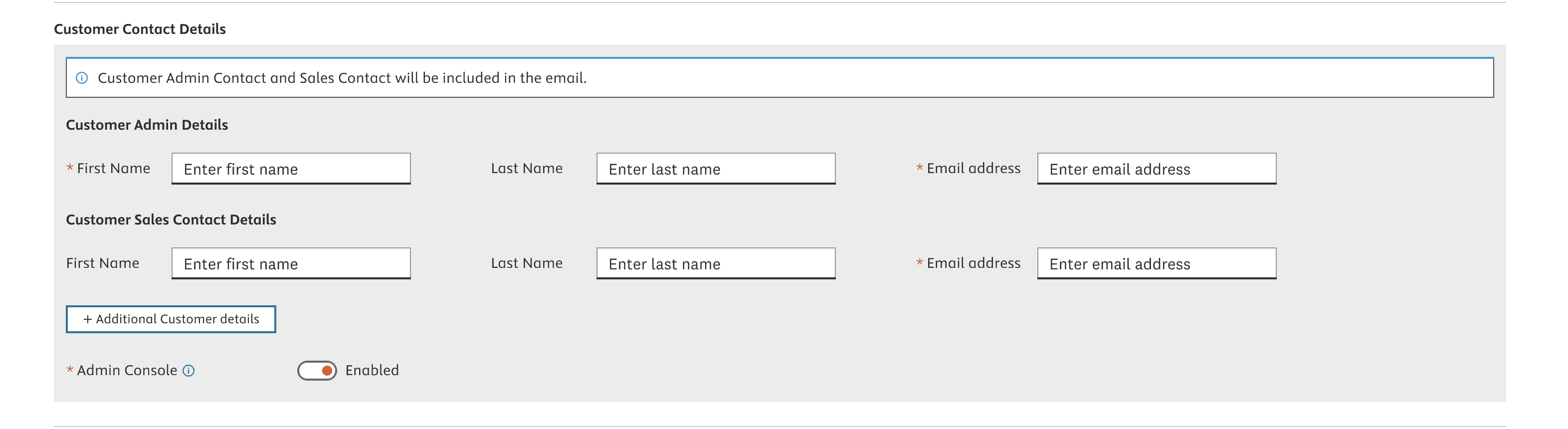
We also wanted to get information about the person who's gonna distribute the links to these unknown users. for us to send email to them we wanted to have their names and email ids.
We also considered the different roles of these admins, some organizations might have these roles, some won't.

Later, to make this form compact, We combined it to one section in UI.
Now, How does that translate to customer admin platform?
We did following 2 iterations for the same.
Modal Panel view(Temporary view)
Stand alone page for trial details


We also gave a simple representation of how a QR code should look like for them.
On left, the MVP and then I styled it as per our design systems components.


Successfully launched for trials for limited organizations and getting positive reviews from internal admins for smoother process.
More metrics yet to be updated.
Thank You 😇