ADMIN CONSOLE
1.
OVERVIEW
Sole Designer
End-to-end Design
Full-time
Admin Console
Customer Admin management
UMUX-Lite Score improvement
Time on task completion rate
Self-Service capabilities have been identified as a key pain point for Librarians(Our majority end users)
In user research we found out 5 key improvement areas in self-service capabilities
Out of those, Usage and Access were most important
A self-service solution has great commercial potential especially in tier 3-4 institutions
48% of Customer Service queries are from librarians are related to access
We needed to further understand how can we improve the user experience for our librarians when it comes to managing access for their users.
We also wanted to understand how and if a centralized portal for access management, usage reporting, and contacting Customer Support will help streamline their workflow.
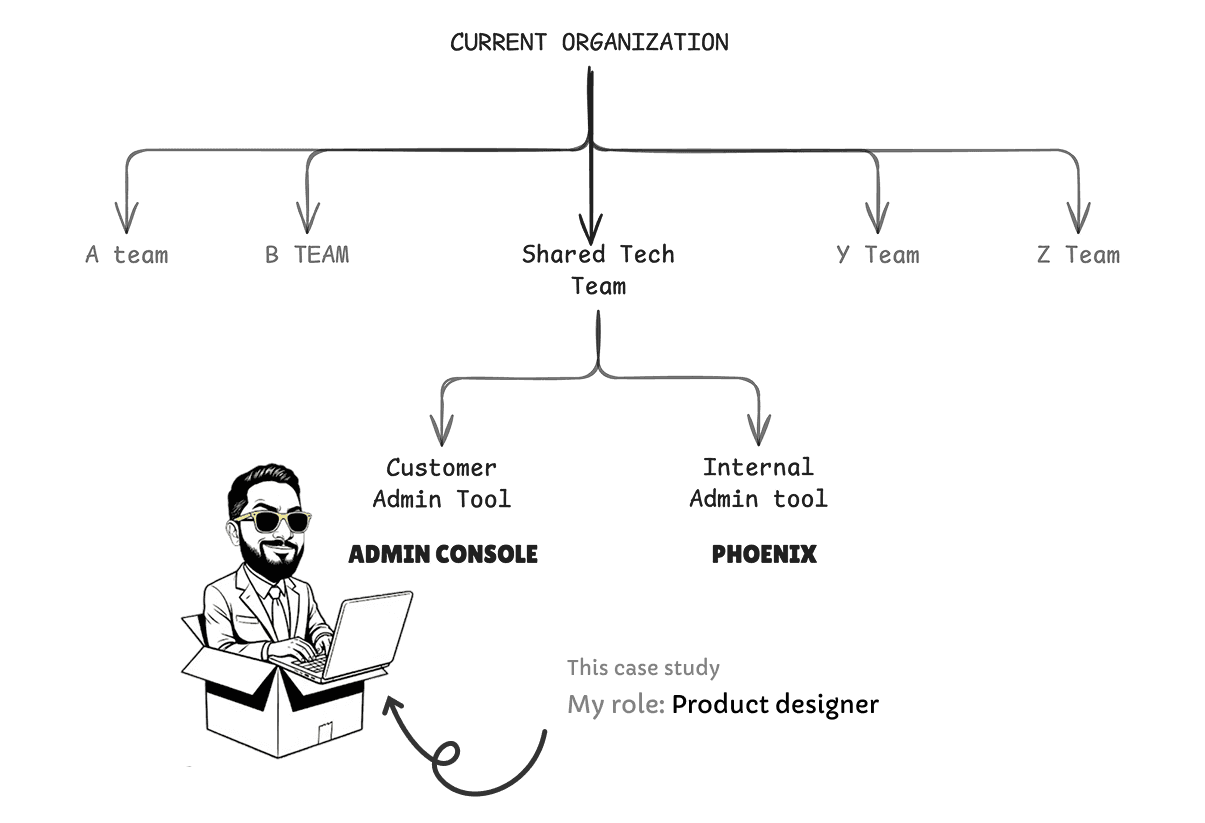
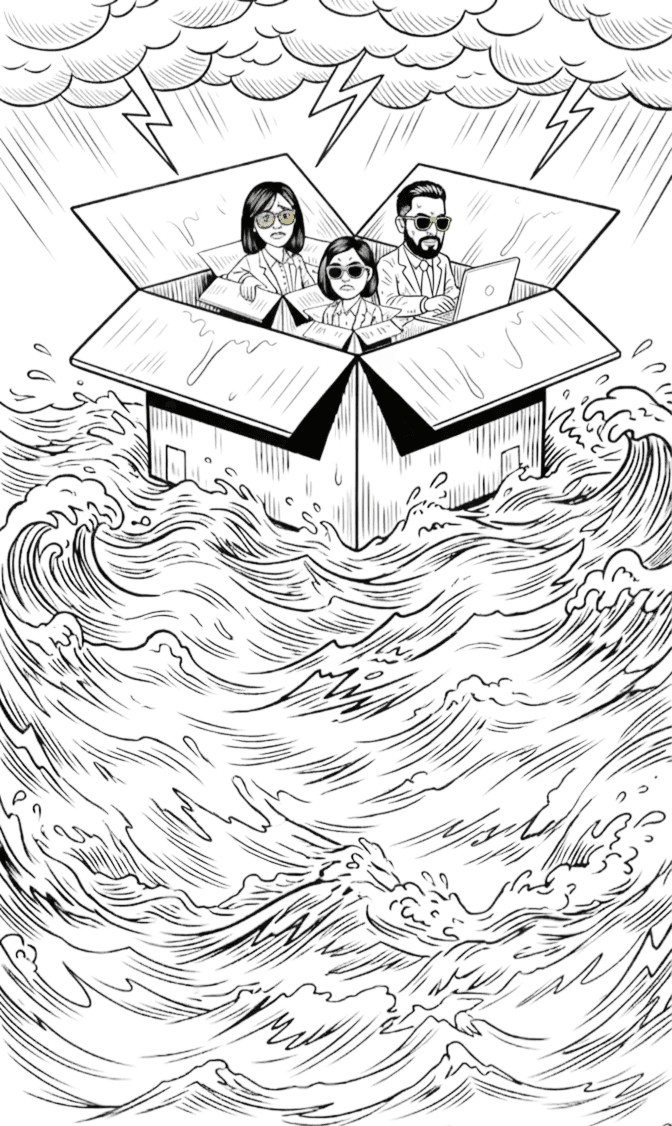
Design System Maturity: The project served as the pilot for a new design system. I balanced high-fidelity product delivery while simultaneously contributing core components back to the system to ensure future scalability.
Navigating Organizational Complexity: In a large-scale enterprise environment with a complex hierarchy, I managed multi-layered approval workflows and maintained momentum through extensive asynchronous feedback cycles.
Pushing Research-Led Design: Faced with a process that initially lacked user validation, I successfully integrated a tight UX research loop into the "from-scratch" design phase, ensuring the final product was grounded in user needs rather than assumptions.
Technical Ambiguity: Parallel backend revamping and evolving data models led to frequent shifts in product terminology. I and our researcher acted as a bridge between engineering and design to ensure front-end consistency despite the shifting roadmap.
Admin Console wasn't built for "the admin." Research surfaced three meaningfully different audiences — each managing access, but for radically different organisations, with radically different ideas of what "managing users" even means.

The Health Admin
Nurse educators and hospital librarians at clinical institutions. Their frustration wasn't with the tool. It was with being in the tool at all.
"This admin work is not part of my job description. My time is better spent planning curriculum that meets nurses' needs."
- Nurse Educator, ODI Survey
What they want: "speed" in, done, out.

The Corporate Admin
Knowledge specialists and corporate librarians, juggling access across a fragmented vendor stack. They couldn't see who in their org had access to what without emailing an Elsevier rep - for every answer.
What they want: "visibility". A single source of truth would be great.
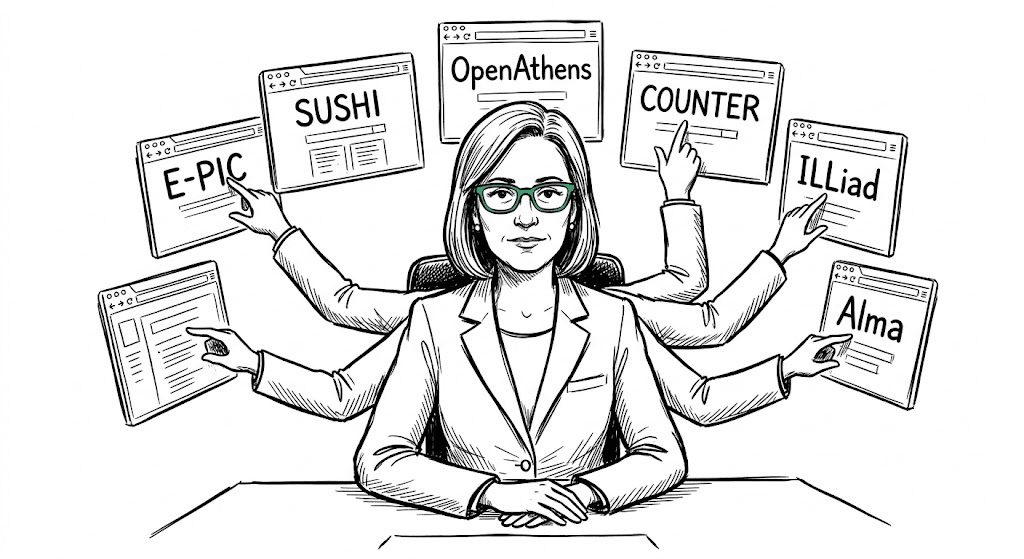
The Academic & Governance Admin
Library directors at universities, often managing five or more vendor systems at once. To answer one usage question, they cross-reference individual product reports.
What they want: context to stop costing them so much. They live in tab purgatory.
The challenge wasn't to build three different products. It was to find one interface that respected all three mental models without compromising any of them.
Our organisation has only used top horizontal navigation for most of their products.
But, In case of admin console we chose left panel navigation, as it’s an established pattern on dashboards for seamless navigation and scalability.
Scalability was the main concern and we were not sure about the categories and information architecture at that point.
Then, we came up with the first version, It was crude, we didn’t know much about how categories are related with each other.
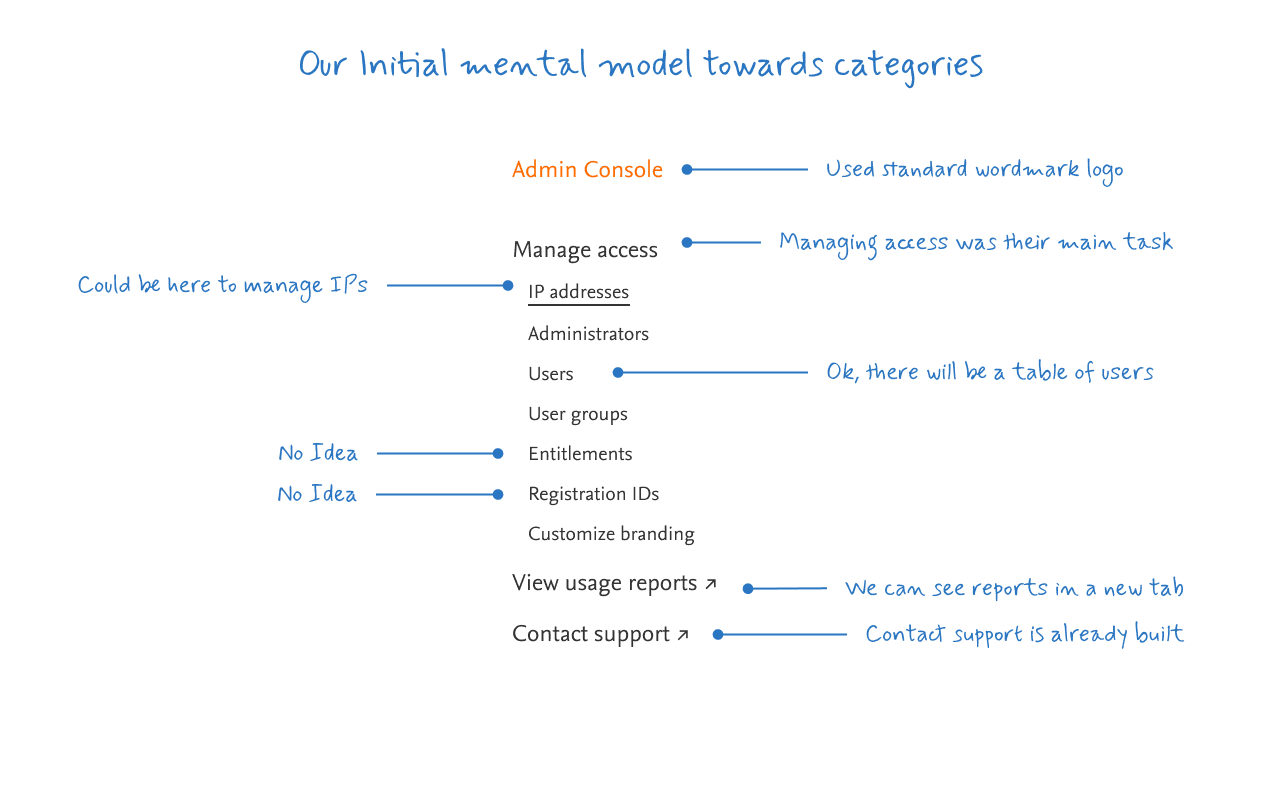
We kept the important groupings initially as
Manage access
View usage reports
Contact support
And, our initial mental model was users were managing access of IP addresses, Admins, Users, User groups, Entitlements, Registration IDs and Custom Branding.
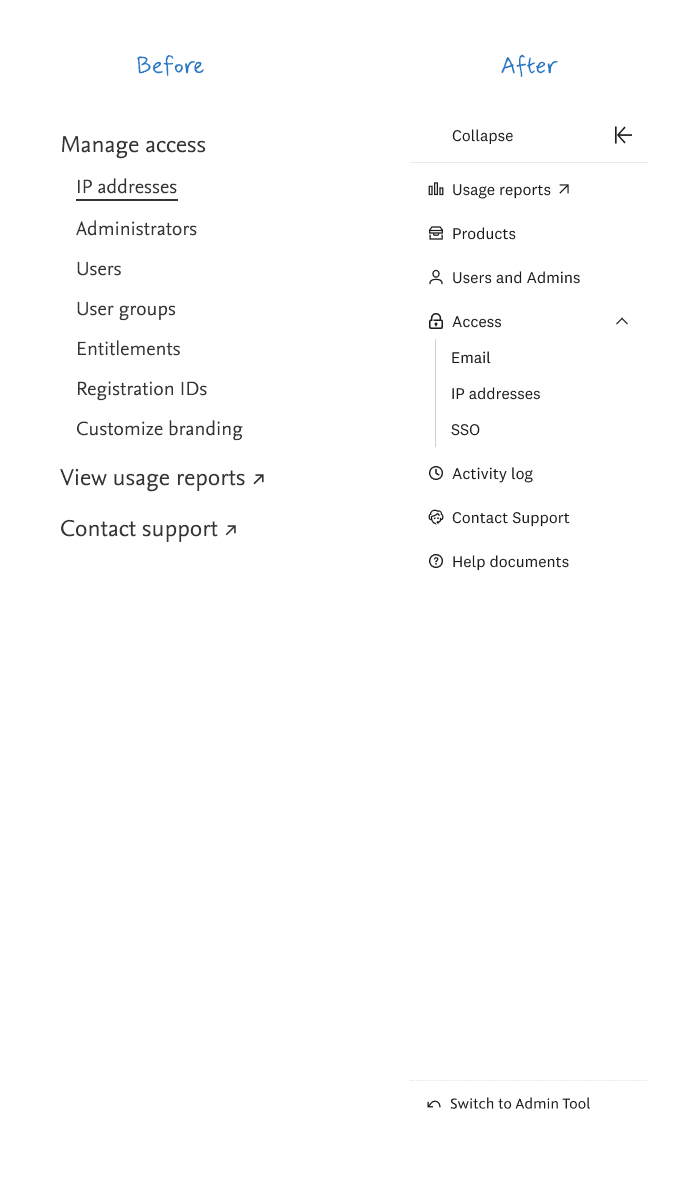
Soon, we realised after talking to customer that their primary need is to view their usage report, this was not integrated in Admin console. That was a separate tool but we were providing an additional bridge to reach that tool.
We kept Products and Users and Admins as a separate tabs because it had many settings and flows which were important for users.
We also made sure the “access methods” were grouped in a separate section in accordion as they were more similar to each other and some other access methods yet to be integrated in Admin Console.
Users were much interested to have a feature of checking their past activities. They were not much familiar with the term “History log” so we also did research and kept name of this feature as “Activity log” they were feeling comfortable with the term “Activity” as it was simple and easy to understand for them.
Support tab was also one of the important part here but the whole idea of this tool was to reduce customer support queries but it’s still relevant to have in the primary navigation.
Also other team was working on documents building for FAQs and help, so we integrated these features in our tool
Now that we had basic items defined, we further explored the scope of features to include in navigation with the help of UX Researcher.
Icons (Eyeball check >> Design system)
Design systems are never perfect. Especially when your design system is not a mature one.
We had a similar situation where our team was the first to implement. We had to go through a lot of quality check because of icons were not perfect when aligned below one another. Most of the issues were with the size, padding and strokes of icons, we made sure we get back to the design systems team to optimise the icon set for some recurring issues.
We kept the important groupings initially as
Manage access
View usage reports
Contact support
And, our initial mental model was users were managing access of IP addresses, Admins, Users, User groups, Entitlements, Registration IDs and Custom Branding.
Screen space on a desktop interface is more important than we think. We had take it for granted because a desktop screen contains a lot of space. However, when it comes to data and information display, every pixel counts.
A Left navigation bar can occupy a lot of width space and diminish the content area. As a result, users will view less data per visual fixation, which can lead to a compact and crowded viewing experience. If we have a data-dense interface, this is far from ideal.
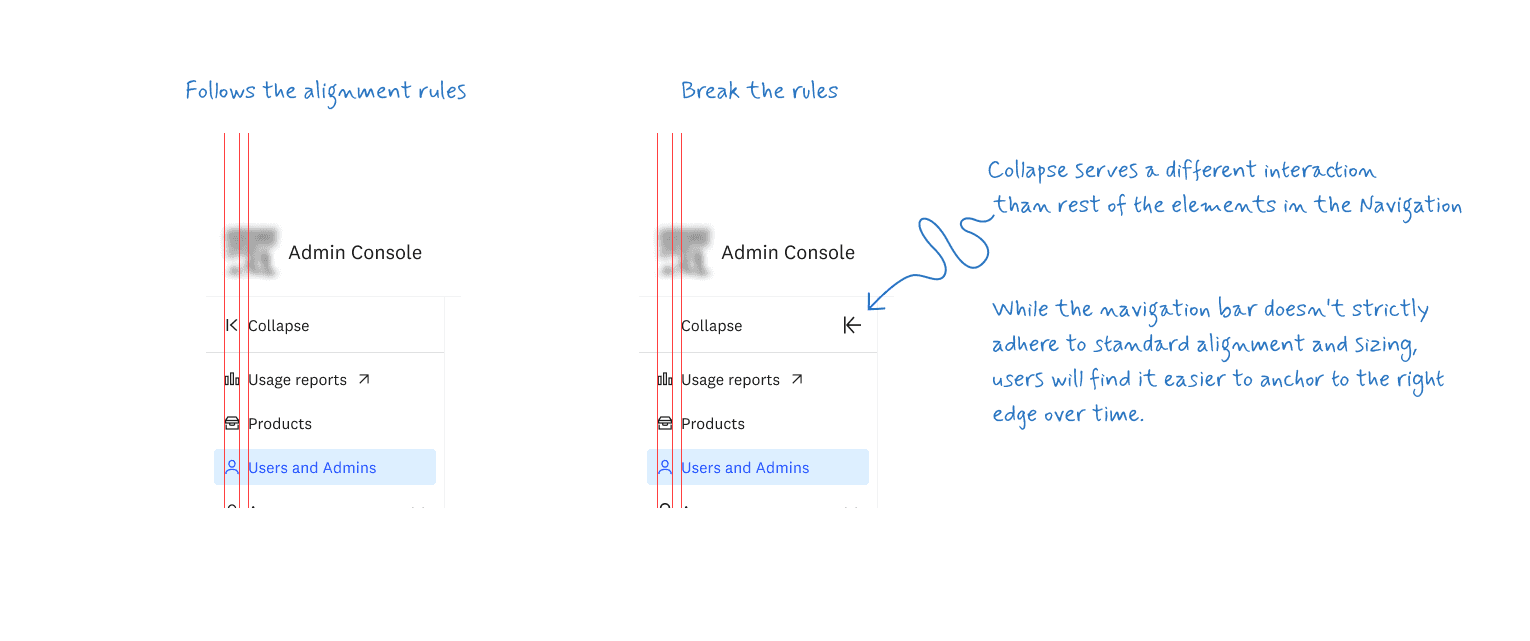
Hover tooltip in collapsed view
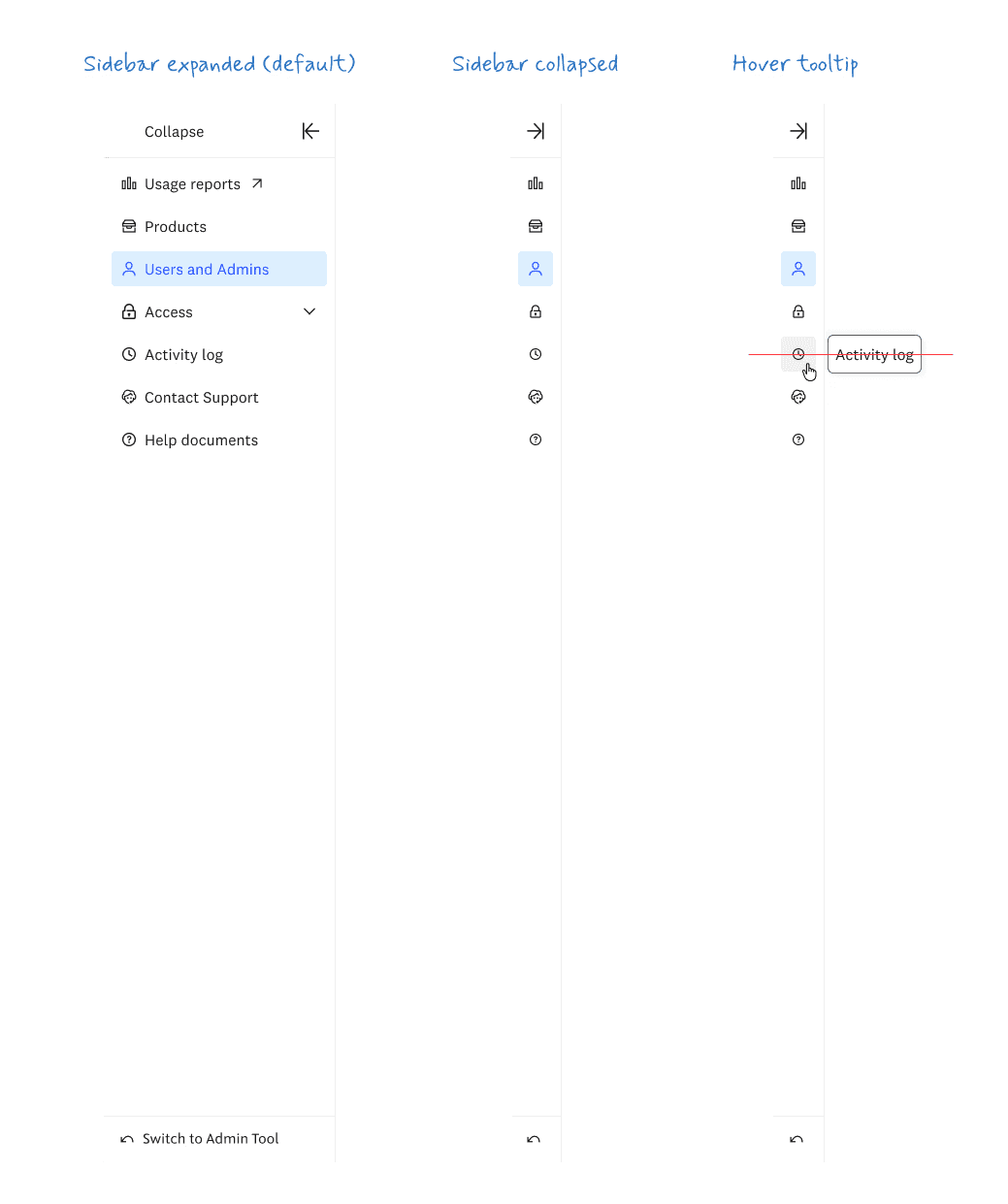
Our first version inherited a structural decision from the legacy admin tool: a separate Users tab and a User groups tab, organised the way IT directories have always been organised.
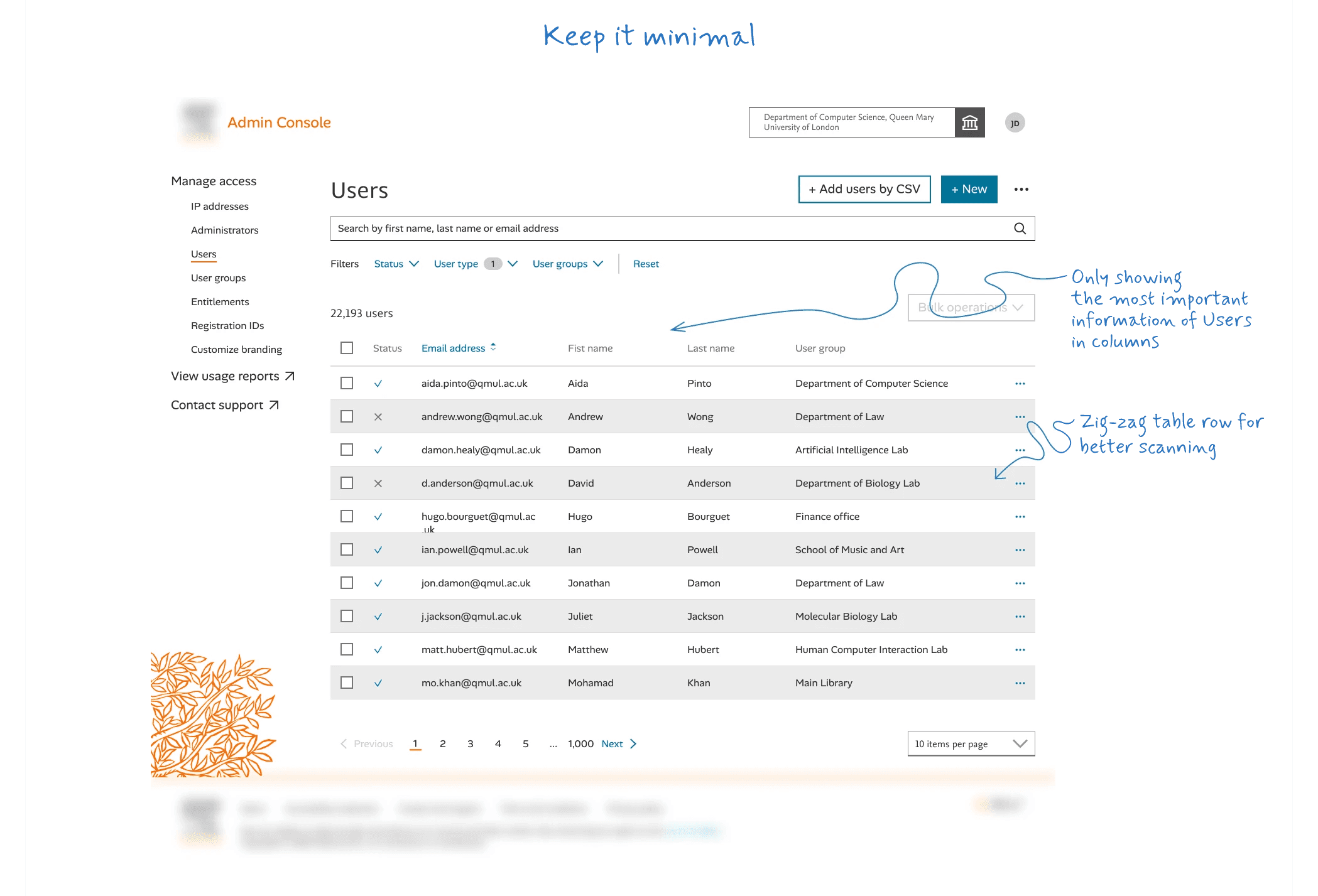
Then we asked librarians what a user group was.
Most couldn't answer.
The few who could didn't see why it mattered as a separate concept, to them, a group was "a list of users." We were asking them to maintain a mental model that existed for the tool's convenience, not theirs.
So we collapsed two tabs into one. Users and Admins and quietly removed User groups from primary navigation. Small in pixels. Big in posture. We stopped treating the legacy tool's IA as reference and started treating it as "Can be improved".
V2 was a deliberate overcorrection.
We pulled every relevant attribute into visible columns:
Admin roles,
Products,
Access methods, all at row level.
We promoted "Admin" from a hidden flag to a stand-alone column (hence the new page name"Users and Admins").
We gave admins what they'd asked for in research, see permission detail without clicking into anyone.
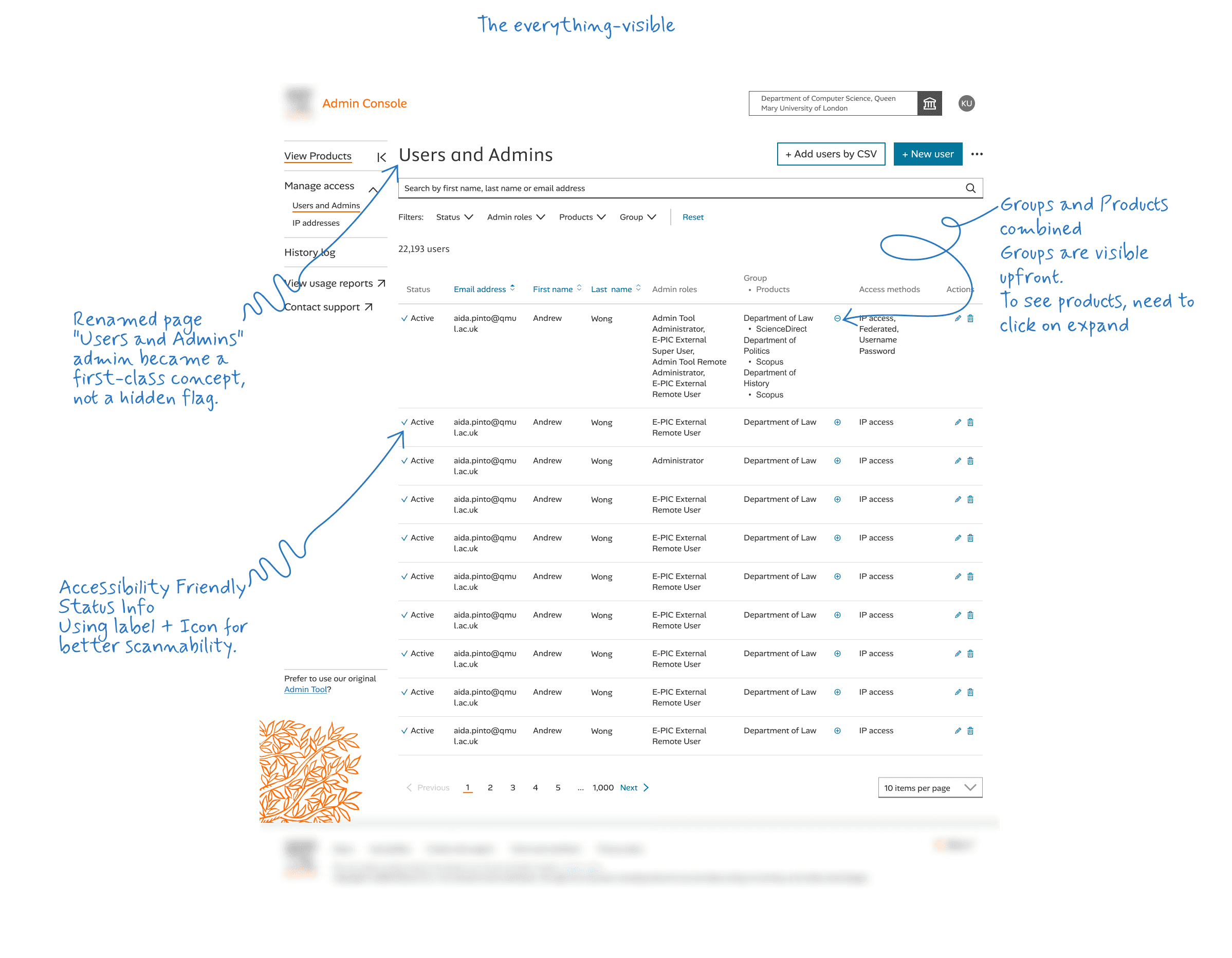
It worked. Sort of. The cost was scannability.
Each row could now hold three stacked roles, four products, multiple access methods.
Row heights varied wildly.
The eye would scan one row, hit a tall row, and lose its place. We'd solved one task (deep-diving into a single user) by breaking another (scanning a long list).
It was the right wrong direction. It surfaced the actual problem: users have nested data, and a flat table can't hold nested data without flattening one of them.
The final version separates identity from detail.
The top-level row answers exactly one question: Is this the right person? Email, name, status, product set, an inline ADMIN badge. That's it.
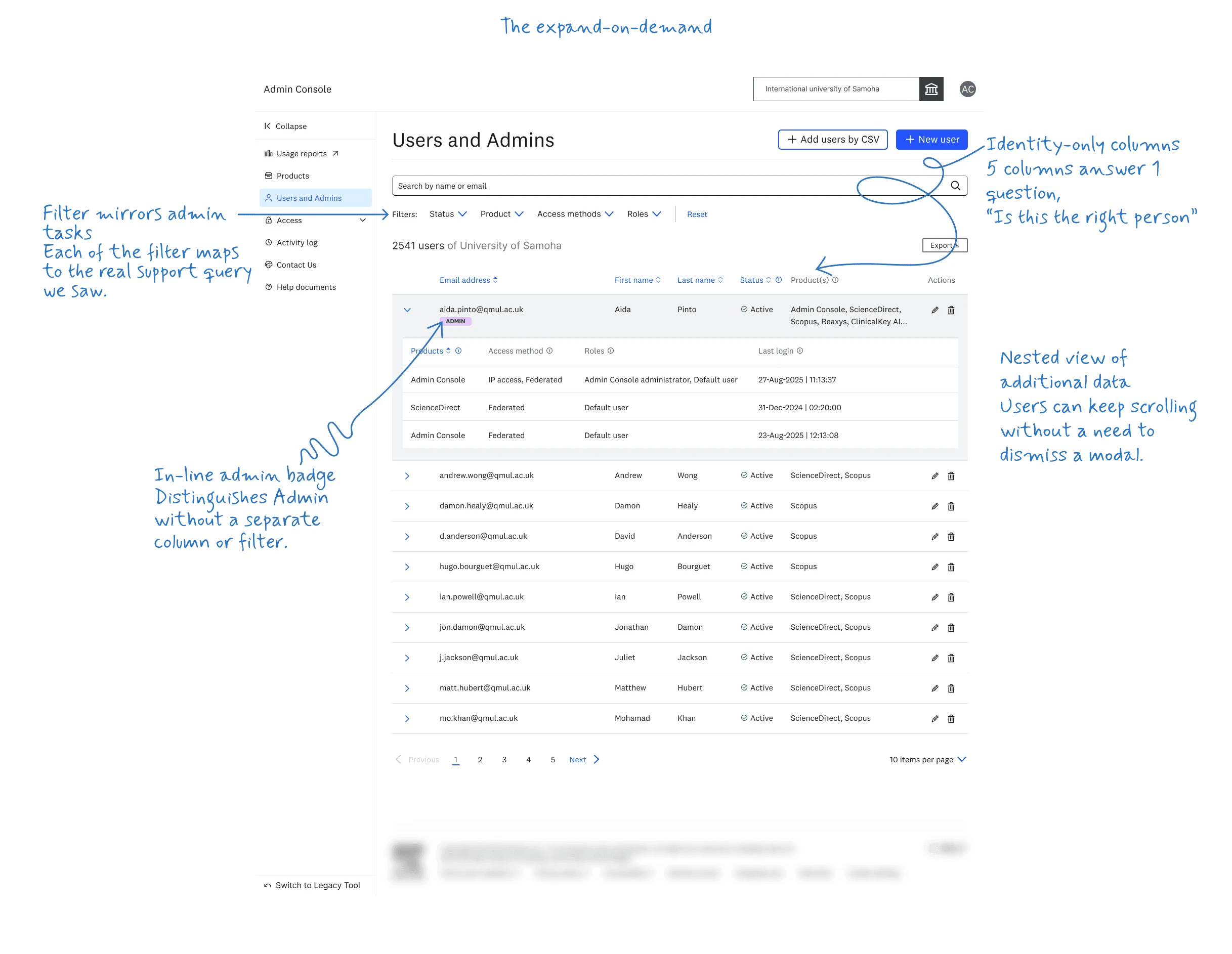
Everything that varies per product: access method, role, last login — moves into an accordion expand that's there only when the admin needs it.
This is progressive disclosure used not as a stylistic flourish but as a structural answer to the data shape. Nested data. Nested interface.
The accordion sits inline so the admin keeps their scroll position. Expand any user, see the full per-product breakdown, collapse, scan to the next.
Why an accordion, not a modal or a side panel?
The Health Admin doesn't have time to dismiss modals. The A&G Admin already lives in tab purgatory, adding another window to manage would have made our tool feel like one more system fighting for their attention. The accordion stays where the user already is. It opens on demand, closes back to where they were, and don't overwhelm with sensory inputs.
Initially we didn't have requirements of bulk operations when we were working on MVP.
Later on, we got one requirement where we need to remove the products from users. More of non assigning users from product's access. Hence, we started with the best possible approach used globally in modern tools
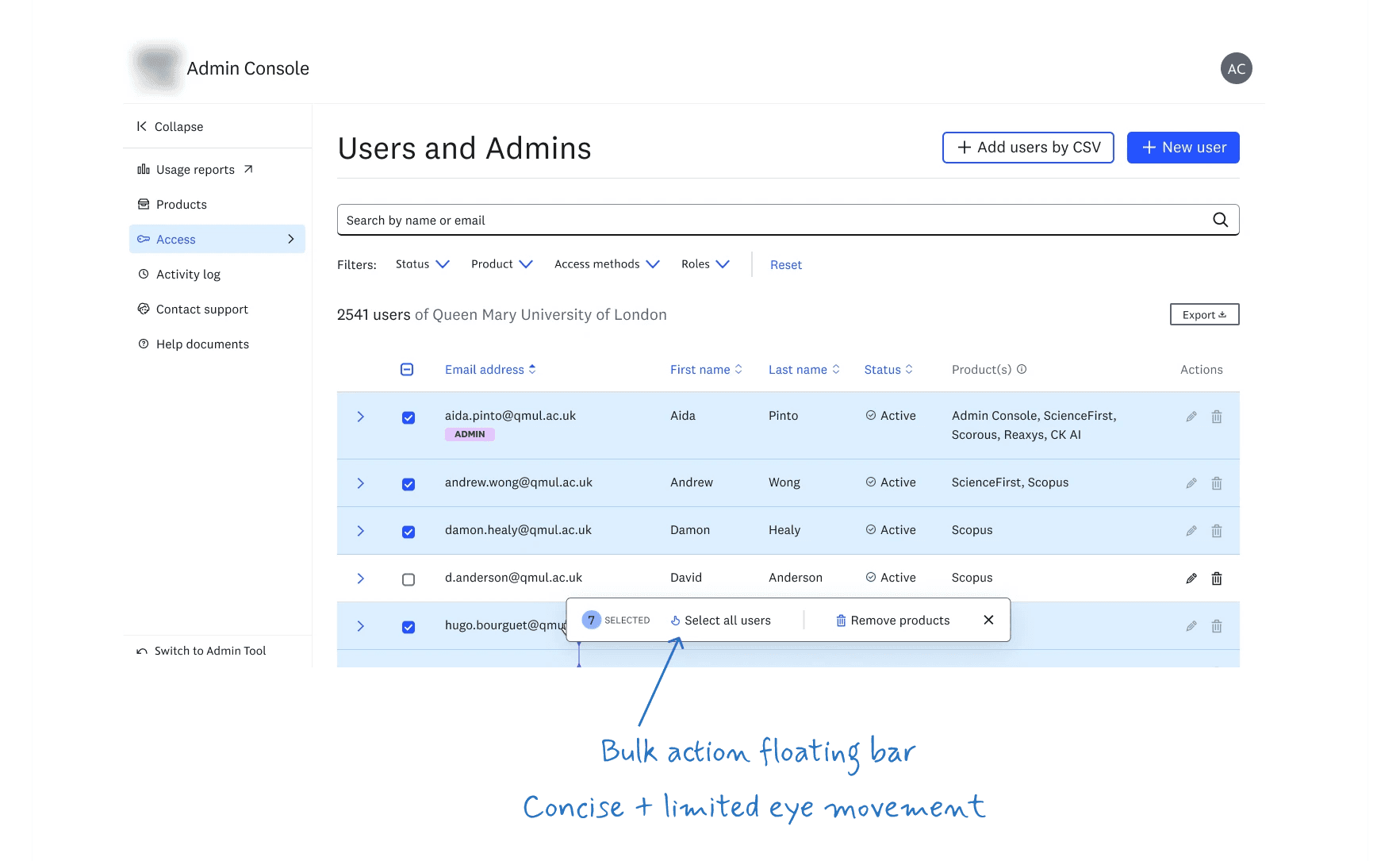
Meanwhile, our design systems team had a static bar pattern so we used that instead of the floating bar. Although we preferred the floating bar(the pattern fight I lost).
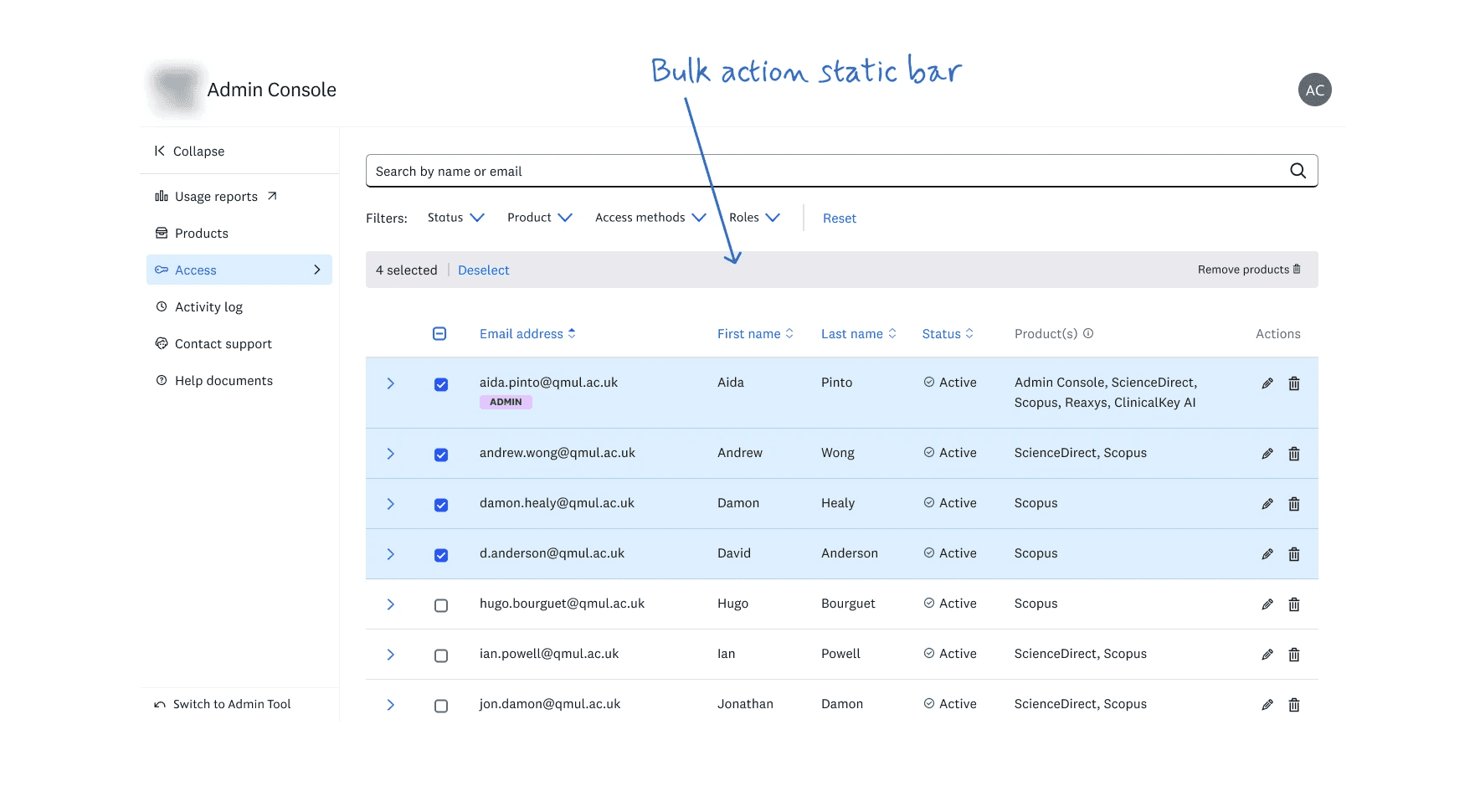
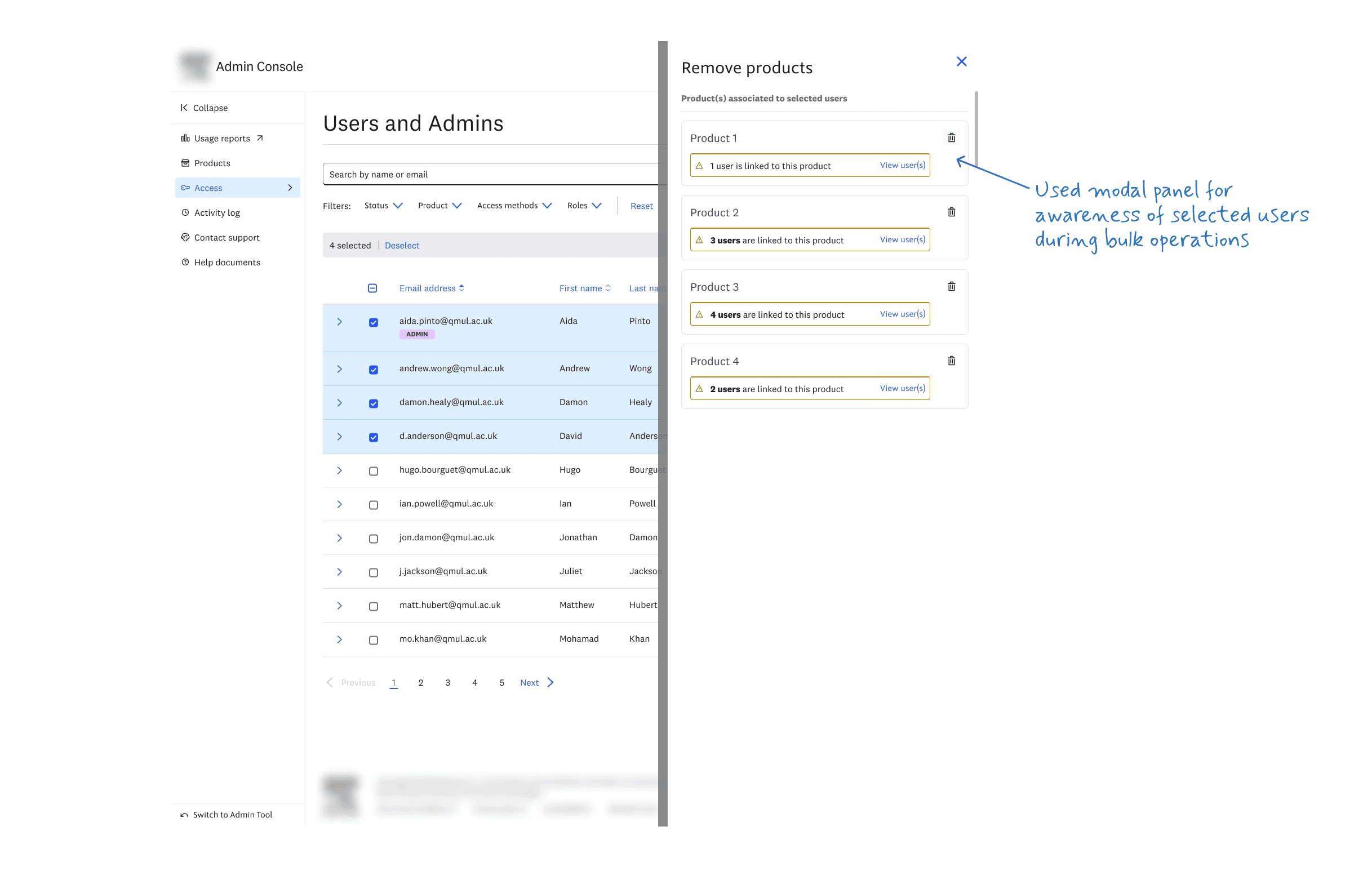
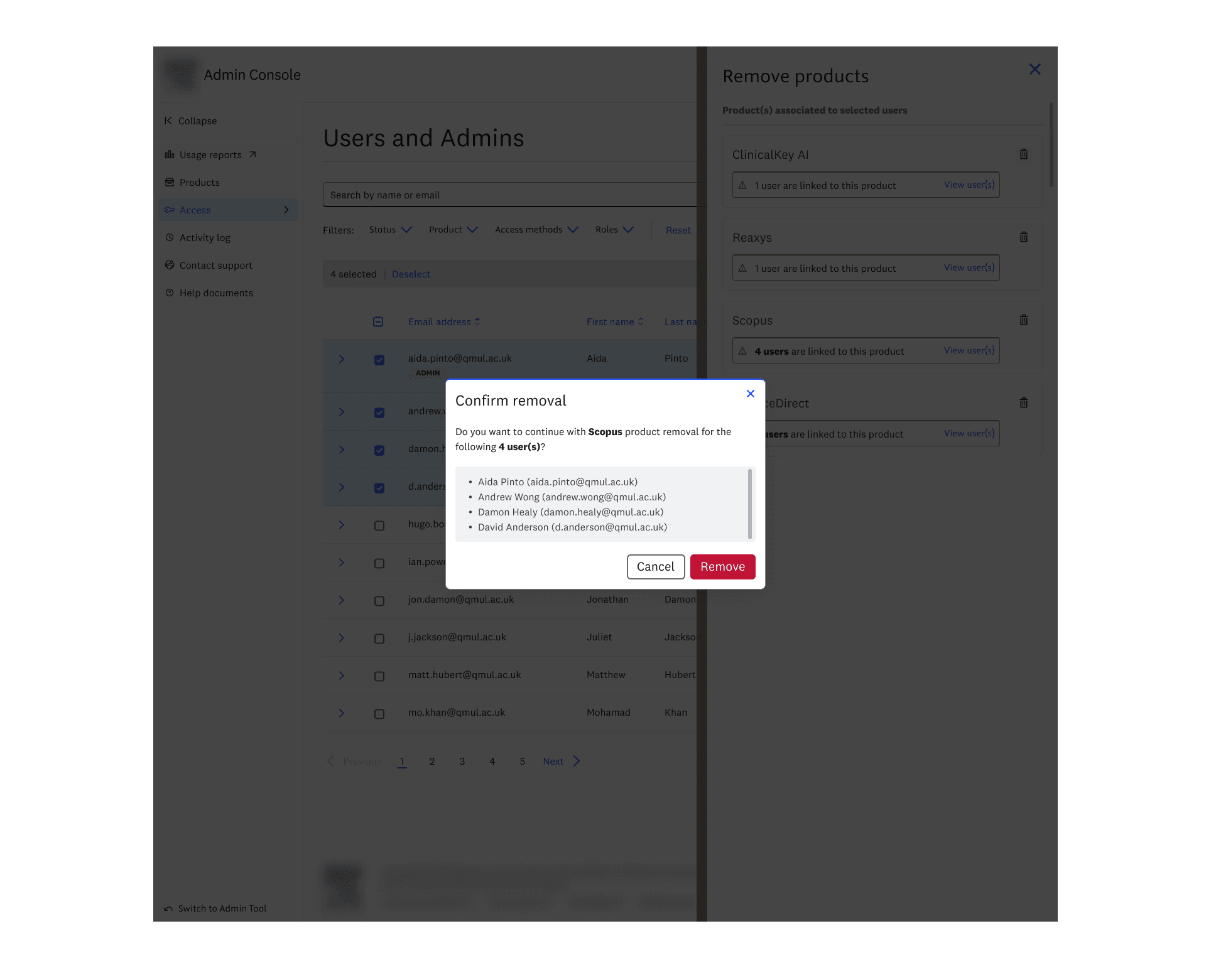
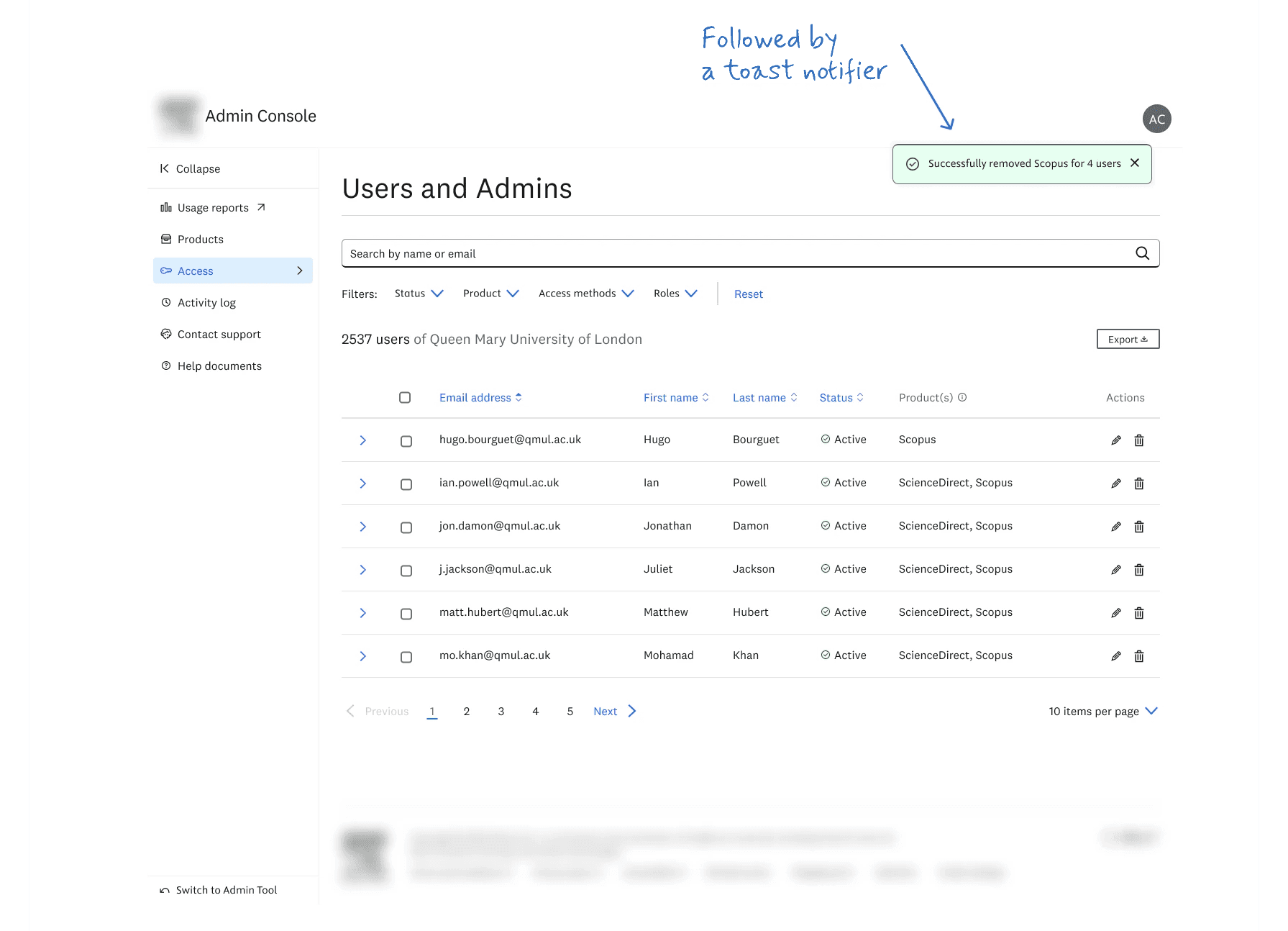
We scaled this pattern across various features, tables, and departmental products. While we initially favored a floating bulk action bar, we ultimately implemented a fixed top bar to prioritize design system consistency and cross-product alignment.
"Not every design fight should be won"
We learned that the real design problem wasn't displaying products, it was building a frame that could hold completely different products without breaking.

The first version treated the page as a read-only directory.
Product cards in a grid, each showing the name, a short description, and start/end dates.
A small settings icon hinted that configuration existed somewhere, but the page itself didn't surface any of it.
We were still learning what admins actually wanted to do on this page, and the safe first move was to show them what they had access to, full stop.
V1's purpose was to make the data legible; we'd add capability once we knew which capability mattered.

The shift came from research.
Admins didn't just want to see products, they wanted to configure them.
Title lists for entitlement verification.
Link resolvers for off-campus access.
Custom branding for institutional identity.
Cards became taller and denser. Tooltips, when triggered, collided with adjacent cards and obscured neighbouring content.
The psychology principle:
Hick's Law in reverse, we'd multiplied the number of decisions per card without sequencing them. An admin who wanted to do one thing now scanned three options on every card, twelve times over.
The business case:
Configuration depth was the right direction, admins who self-serve don't email support. But forcing every card to show every option meant the page rewarded power users at the cost of everyone else.
The trade-off:
We'd solved one task by making tools discoverable and breaking another: scanning the page to find a specific product.

This iteration was the moment the Products page started to feel like part of a coherent system rather than an isolated screen.
We borrowed the accordion pattern directly from the Users and Admins table: identity at the top level, detail behind the expand.
Click any product to reveal its tools as proper card components inside the expanded view.
Product name and key dates stayed visible by default. Tools, once chaotic inline links became structured, navigable cards within the expanded accordion.
The psychology principle:
Admins had already learned how the accordion worked on the Users page. Applying the same pattern here meant zero new learning.
Jakob's Law applied internally: users prefer your product to work the way the rest of your product works.
The business case:
Reduced support overhead from "how do I configure X" questions, because admins discovered tools by reusing a mental model they already had.
The trade-off:
The accordion held the page together beautifully when each product had two or three tools. As we added more products with deeper functionality, we started seeing the seams, five or six tools inside an accordion expand felt like clutter, not clarity.
Here we cracked structural breakthrough by showing a product in it's stand-alone page.
Although the navigation to reach the product was sort of an isolated new pattern we haven't used elsewhere in this product.
A kind of new learning experience for users, hence we worked on the next navigation pattern in V5.

Each product now has its own canvas.
Tabs at the top let admins switch between products without leaving the Products page context.
Some products show four tools; some show one; some show zero. The frame stays consistent, the contents vary.
The psychology principle:
Tools that belong to a single product live on a single page, in a single grid.
Fitts's Law for grouped actions.
Admins doing five things on one product don't context-switch between cards or expand multiple accordions; everything they need is in one bounded space.
The business case:
This was where the design earned its keep on the commercial side.
Sales teams now have a clear page-per-product to demo to prospects.
Future products can ship with their tool sets immediately, no IA renegotiation needed. The frame scales.
The trade-off:
Tab navigation at this density can hide products.
Users with five or fewer subscriptions see everything in the tab strip; users with twenty don't, they need to scroll the tab bar horizontally. Worth the trade for the consistency of the frame
flagged as a v2 concern if significant usability issues found.
"The harder design move is knowing when a layout has stopped scaling"
Six months after soft launch, we benchmarked Admin Console against the legacy Admin Tool using the UMUX-Lite scale, an industry-standard usability metric on a 100-point scale. Anything above 68 is considered good.
Usefulness
Usability
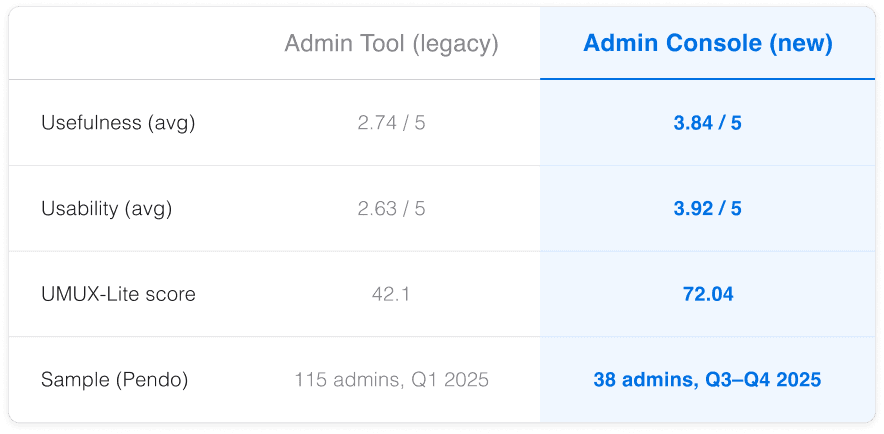
The legacy tool sat in the poor band. Admin Console moved comfortably into the good band.
A 71% relative improvement on the headline score.
Tracking a behavioural metric, not just a perceived one. UMUX-Lite captures how users felt about the tool. The metric I wish I'd set up from day one is time-to-completion for the top three admin tasks. That's the one that proves the self-serve thesis at the operational level, not just the perception level.
What I'm taking with me
Inherited IA is a hypothesis, not a constraint. Every concept carried over from a legacy product needs to be re-validated.
Identity scans. Detail dives. When data is nested, the interface needs nesting too, but the nesting must be optional, not forced.
Solve one pain at a time. Integrate at the seams. Designing each module for one specific persona's pain, then stitching together at the seams, is more rigorous than designing the experience top-down.
Thank You 😇